
How it works
From scan to decision.
Two steps.
Run sense to investigate supported scanner findings. Open lens to inspect the decisions. Here's what that looks like on Keycloak, from the first summary to the reason a finding stays open. This is the working first step. The proposed direction is on our mission page.
Step 01 / sense
sense run keycloak
Investigate the findings. Write the evidence and the review queue.
Run the scan.
Get a review queue.
ICTX works with findings from scanners such as Opengrep and Semgrep. Sense attaches evidence from your code and configuration, applies deterministic rules, and separates findings by what needs to happen next. An agent is the fallback for genuinely ambiguous evidence, not the first step.
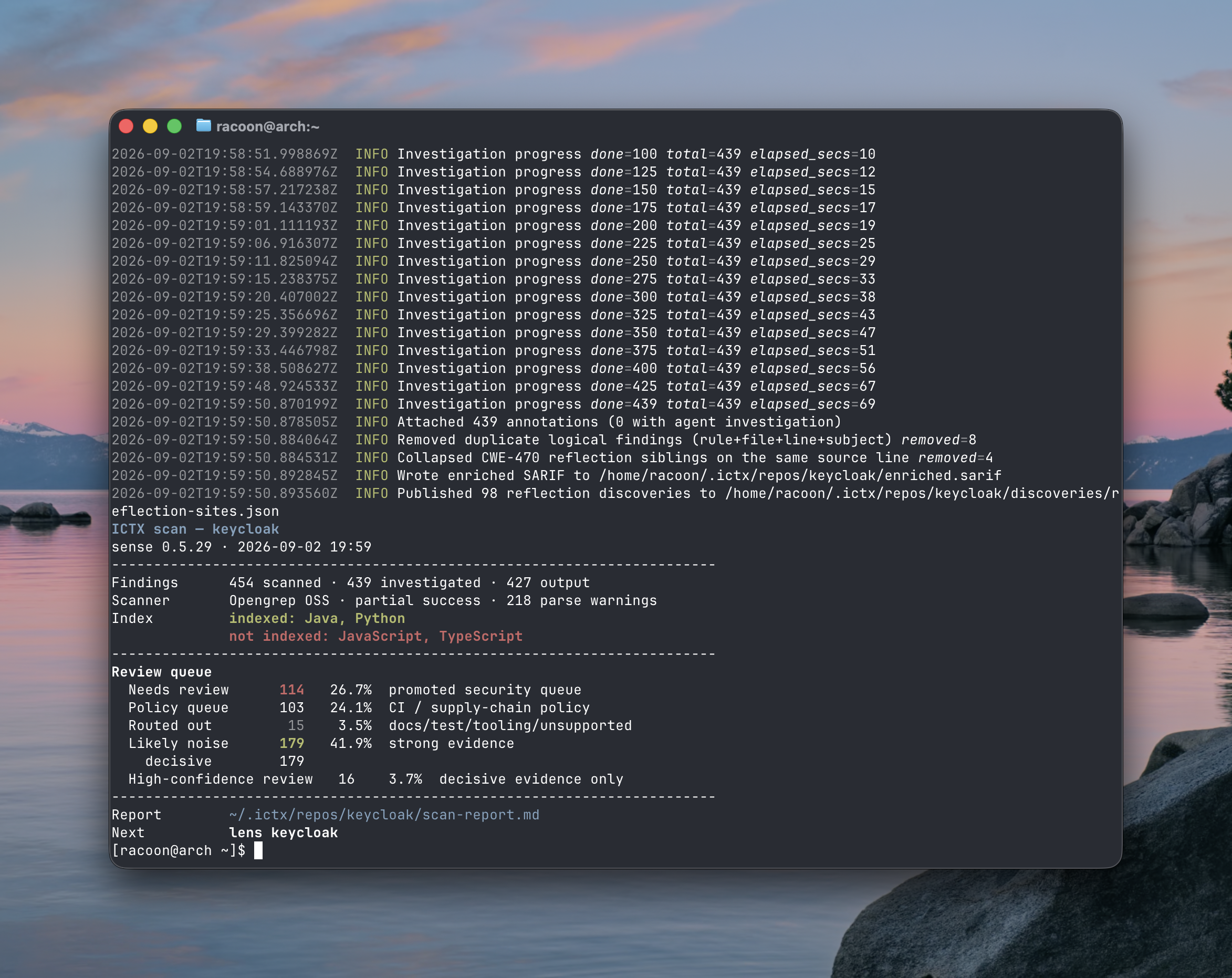
Read the summary, not just the total.
In this run, 454 findings were scanned and 439 investigated. After deduplication and collapsing related findings, 427 remained in the output. There were 0 agent investigations. The five queues explain where to spend your time:
- Needs review114
- Promoted to the security review queue for a closer look.
- Policy queue103
- CI and supply-chain policy findings, separated from the security queue.
- Routed out15
- Docs, tests, tooling, or unsupported contexts, kept distinct from proven noise.
- Likely noise179
- Decisive evidence supports closing these findings, with the reason retained.
- High-confidence review16
- Decisive evidence calls for review. Still a finding to confirm, not a confirmed vulnerability.
Keep the coverage limits in view. This scan reports partial scanner success and 218 parse warnings. Java and Python are indexed; JavaScript and TypeScript are not indexed. A smaller queue does not mean the entire codebase was proven safe.
Sense writes the evidence to enriched.sarif and the readable summary to scan-report.md. The summary is your starting point; the evidence stays attached for the next step.
Step 02 / lens
lens keycloak
Open the findings. Inspect the reason behind each decision.
See the verdict.
Check the evidence.
Lens is the keyboard-driven terminal interface for reviewing findings. The left pane is your list: verdict, weakness (CWE), and file. Select a finding and the right pane shows its location, scanner rule, decision, reasoning, and surrounding code.
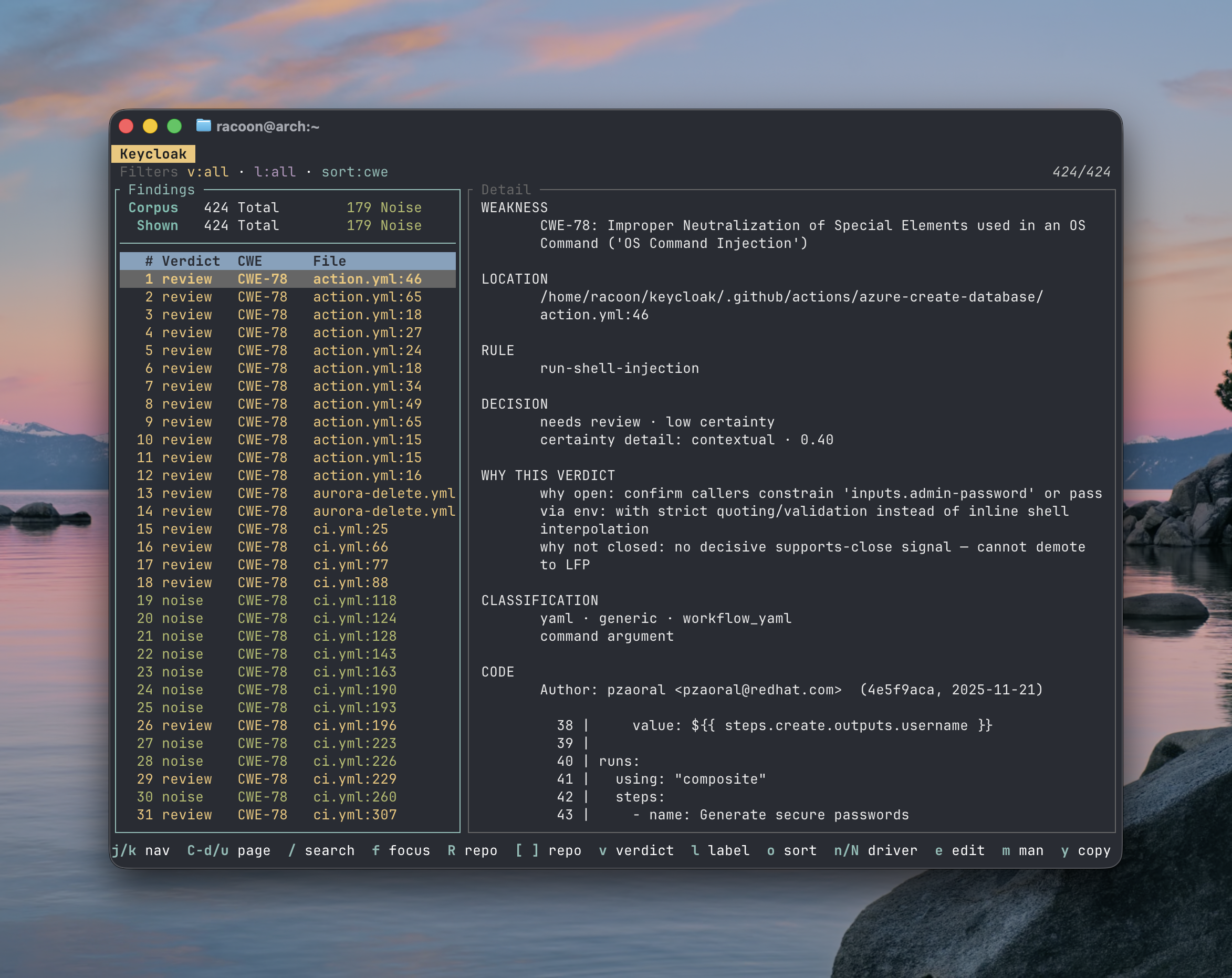
An open finding, with a specific question.
The selected finding is CWE-78: OS command injection in action.yml:46, flagged by the run-shell-injection rule. Lens shows needs review · low certainty. That is not a confirmed exploit, and it is not enough evidence to dismiss the finding.
- Why open
- Check whether callers constrain
inputs.admin-password, or pass it through an environment variable with strict quoting and validation instead of inline shell interpolation. - Why not closed
- No decisive supports-close signal was found. Without that proof, ICTX keeps the finding open rather than treating uncertainty as evidence of safety.
Use the code and author context to investigate that question. Filter by verdict or label, sort by weakness, and search the list. The shortcuts are visible in the footer: j/k to navigate, / to search, and e to edit. The goal is a decision you can explain, not a score you have to trust.
What you get
Make the review inspectable.
Know what needs your attention.
Separate security review, policy issues, and likely noise instead of treating every scanner alert as equally urgent.
Start with the evidence.
Review the code context and reasoning behind a verdict without rebuilding the investigation from scratch.
Know what to check next.
When evidence is inconclusive, get a specific question to investigate, not just another “needs review” label.
In this Keycloak sample, 179 findings were classified as likely noise, with reasons retained.
This run had partial scanner coverage. A smaller queue does not mean the entire codebase was proven safe.
Your repo. Your evidence.
Your decision.
Install ICTX to try the workflow locally, or explore the repository directory to see more scan results.
curl -fsSL https://ictx.sh/install | sh